Bank Policy Assistant through RAG
An AI assistant that gives bank employees instant access to internal policy processes.
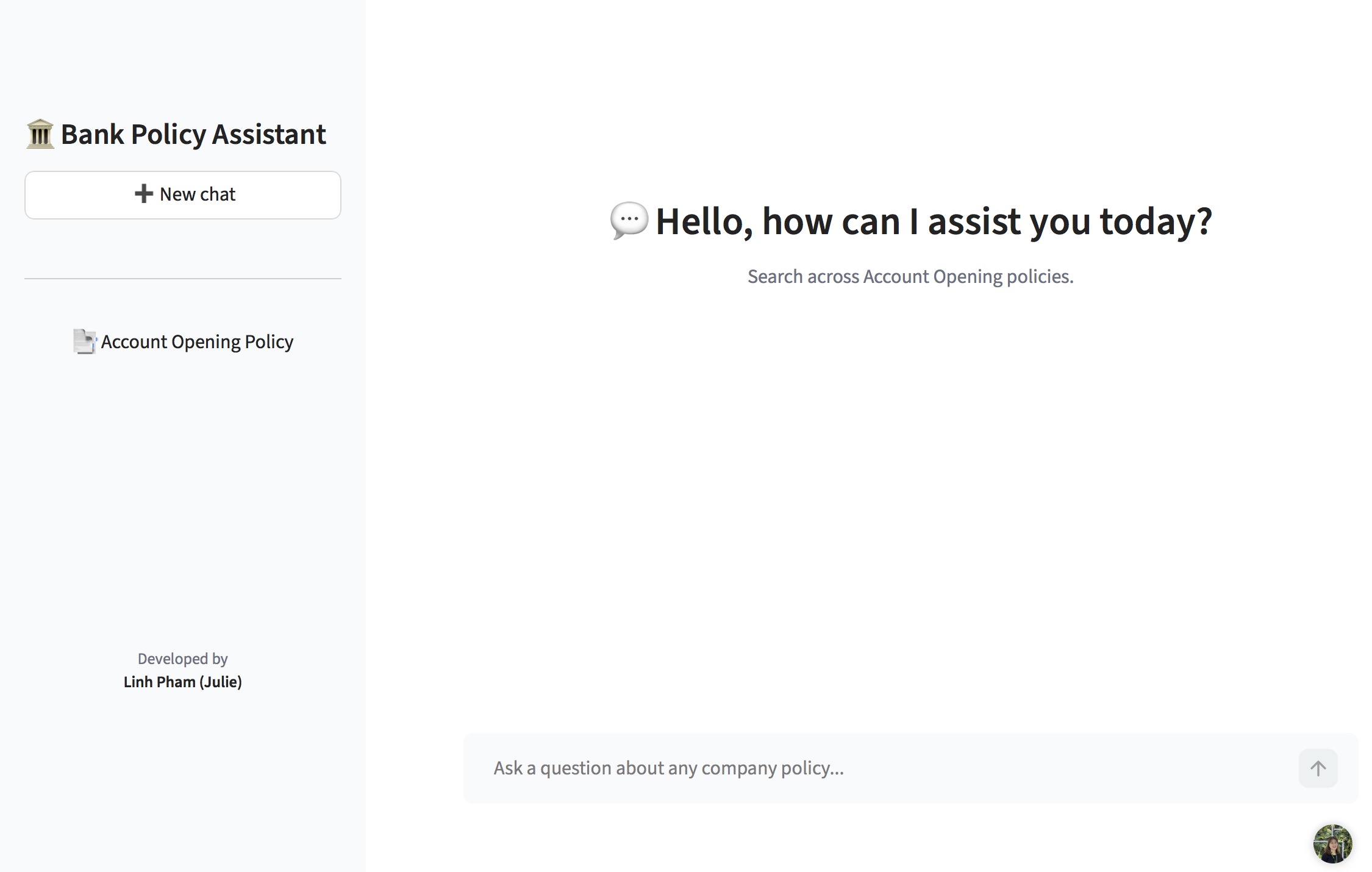
1. Context and problem
In highly regulated industries like finance and banking, employees often have to navigate many complex policy documents.
Traditionally, operational teams have to read the policy to understand the procedures and look up on the documents whenever they have a question.
With AI, finding answers to these questions becomes much easier. However, companies cannot simply use public AI tools like ChatGPT or Claude for this since it creates security and privacy risks.
This raises a different question: How could a bank build an AI assistant that can work with its internal information while controlling what information the AI can access and return?
2. Solution architecture
For this project, I built a prototype of an AI assistant using Retrieval-Augmented Generation (RAG). Instead of asking the LLM to answer directly from its existing knowledge, RAG first retrieves relevant information from a document database and provides it to the LLM as context [1].
The prototype follows the core architecture that could be used in a real banking application, while using publicly available APIs for the AI components due to the resource constraints of the project.
How RAG works
The system has two main stages: document indexing and question answering.
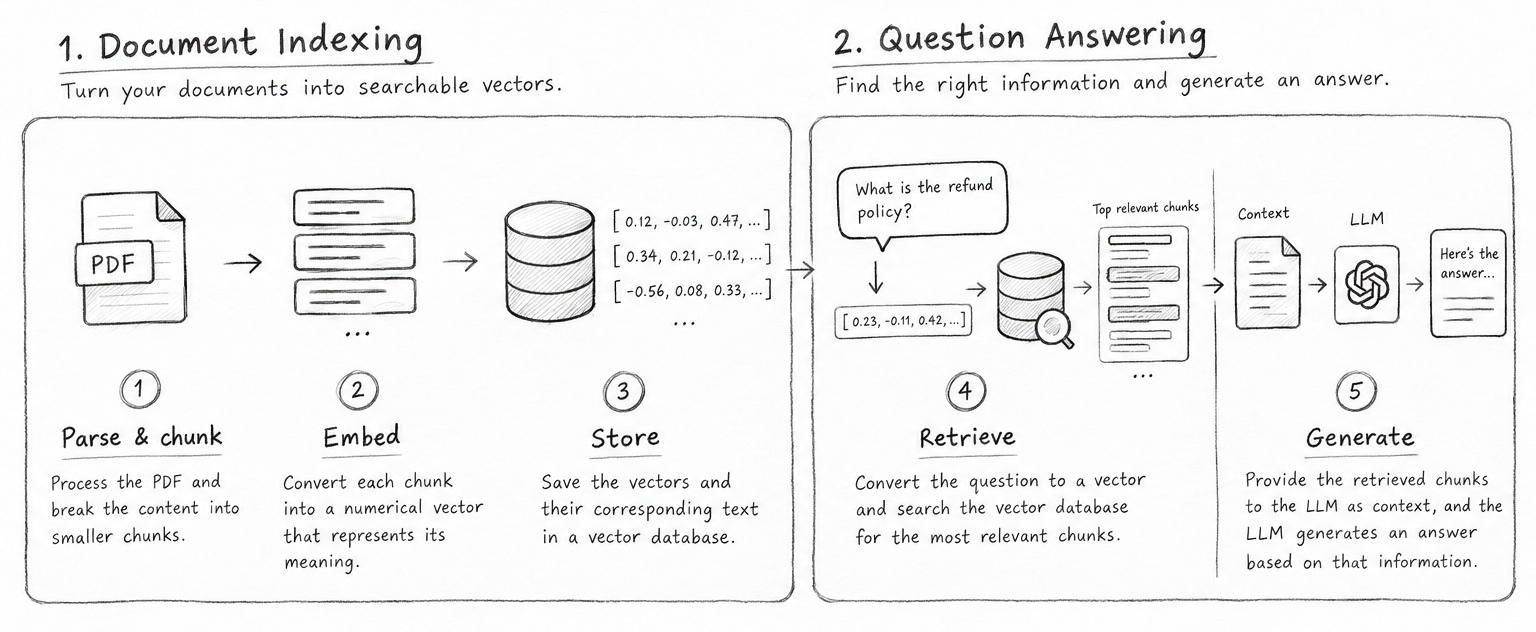
Document indexing
- Parse & chunk — The system processes the PDF and breaks the content into smaller chunks.
- Embed — Each chunk is converted into a numerical vector that represents its meaning.
- Store — The vectors and their corresponding text are stored in a vector database.
Question answering
- Retrieve — When a user asks a question, the question is also converted into a vector. The system searches the vector database for the most relevant chunks.
- Generate — The retrieved chunks are provided to the LLM as context, and the LLM generates an answer based on that information.
How I implemented it
I implemented each part of this architecture using the following tools:
- Document Parsing: I utilized
PyMuPDF4LLMto process PDFs, converting layouts and tables into Markdown so the LLM can understand data relationships more easily. - Vectorization: I implemented Google Gemini’s embedding model (
gemini-embedding-2) for vectorization of the documents. - Vector Database: FAISS (Facebook AI Similarity Search) is used for in-memory vector storage.
- Generation: I integrated Groq API for high-speed output via specialized Language Processing Units (LPUs).
- Frontend UI: A custom Next.js React application, styled with Tailwind CSS.
3. Current Application vs. Production-Grade Deployment
Due to resource constraints, the current implementation differs from a real-world bank deployment, as detailed below:
| Component | This Project (Current) | Real-World Bank |
|---|---|---|
| Vector Embeddings | Google Gemini Embeddings API | Private endpoint (e.g. Azure OpenAI) inside corporate firewall |
| Vector Database | FAISS (Local/In-Memory) | Client-server vector DB for millions of documents |
| LLM Generation | Groq Cloud API (LPU Inference) | Private VPC or fully localized LLM on internal GPU nodes |
| Infrastructure | Vercel (Next.js Edge + Python Serverless) | Dockerized containers on internal Kubernetes clusters |
Application limitations
- Rate limiting: Because the system relies on a free-tier Groq API key, concurrent users submitting queries simultaneously may experience brief rate-limit delays.
- Stateless Vercel deployments: Because the backend is a stateless Python Serverless Function on Vercel, conversation memory is held entirely in the browser’s React state. A hard refresh of the browser will clear the conversational history.
4. Challenges across the development lifecycle
Challenge 1 — The “out-of-bounds” hallucination
During early testing, when asked a policy question not covered in the bank’s documents, the LLM would hallucinate an answer based on its training data [4]. The following example illustrates this case.
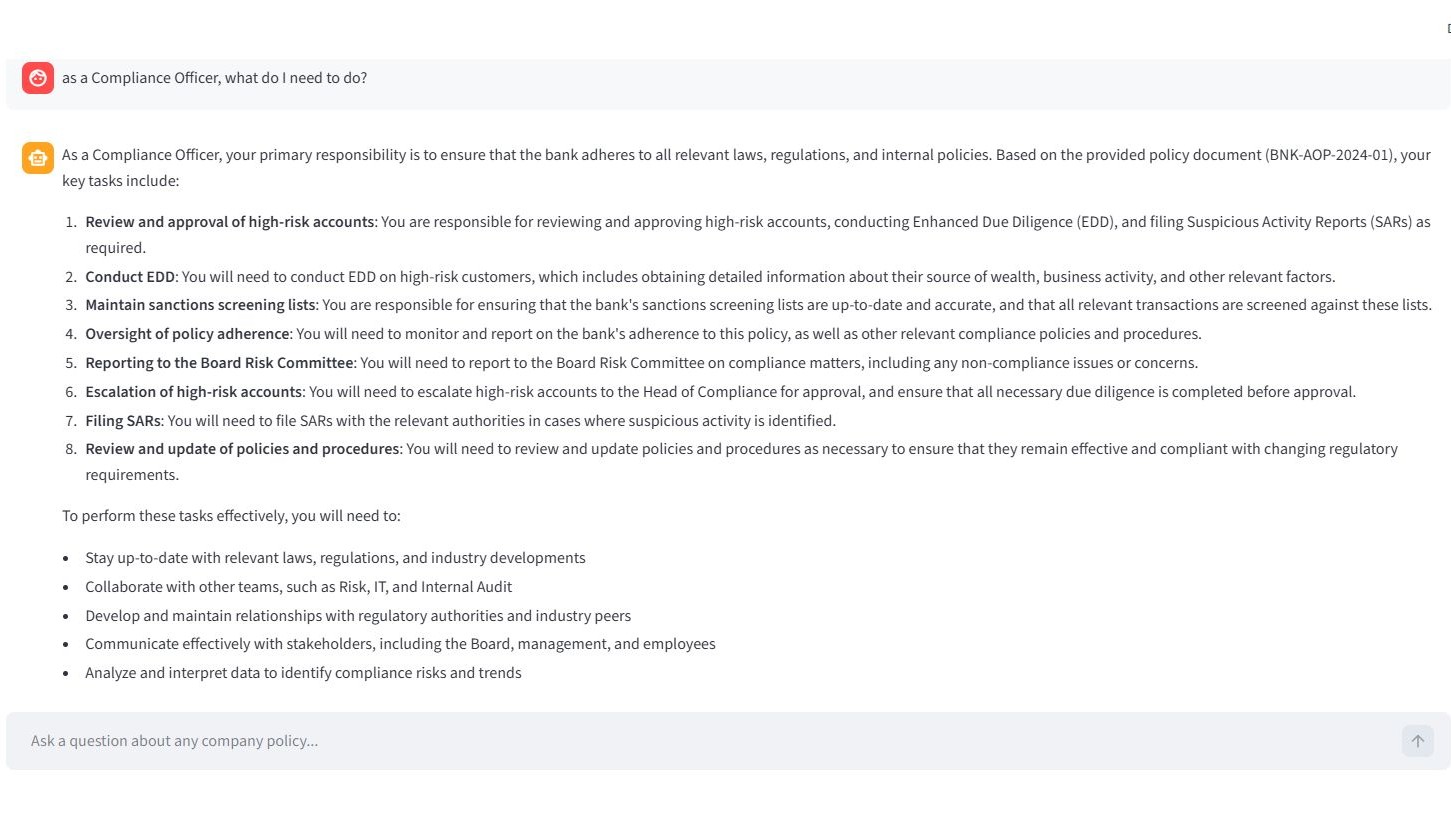 Solution: I implemented parameter tuning and prompt engineering.
First, I hardcoded the LLM’s
Solution: I implemented parameter tuning and prompt engineering.
First, I hardcoded the LLM’s temperature to 0. By forcing temperature to zero, I stripped the model of its creative autonomy, making outputs deterministic.
Second, I rewrote the system prompt to use a 8-rule specific constraints list:
You are a strict, highly conservative corporate compliance extractor for a bank.
CRITICAL RULES:
1. STRICT GROUNDING: Answer ONLY using the information explicitly written in the Context. Do NOT add general knowledge or industry best practices.
2. CITATION: You must provide direct inline citations to the policy document for every claim.
3. COMPREHENSIVE DETAIL: Provide exhaustive details instead of over-summarizing.
4. ENUMERATION: When multiple steps or conditions are present, strictly enumerate them.
5. NO TABLES: Output formatting must be conversational and structured with headers and lists, never tables.
6. ENTITY ISOLATION: Pay extreme attention to specific job titles; do not mix responsibilities.
7. NO EXTRAPOLATION: Do not infer how a job should be done. Just list the duties stated.
8. EVIDENCE: Whenever possible, use the exact phrasing from the policy.
Below is the LLM’s revised response following these changes.
Challenge 2 — Stateless LLM
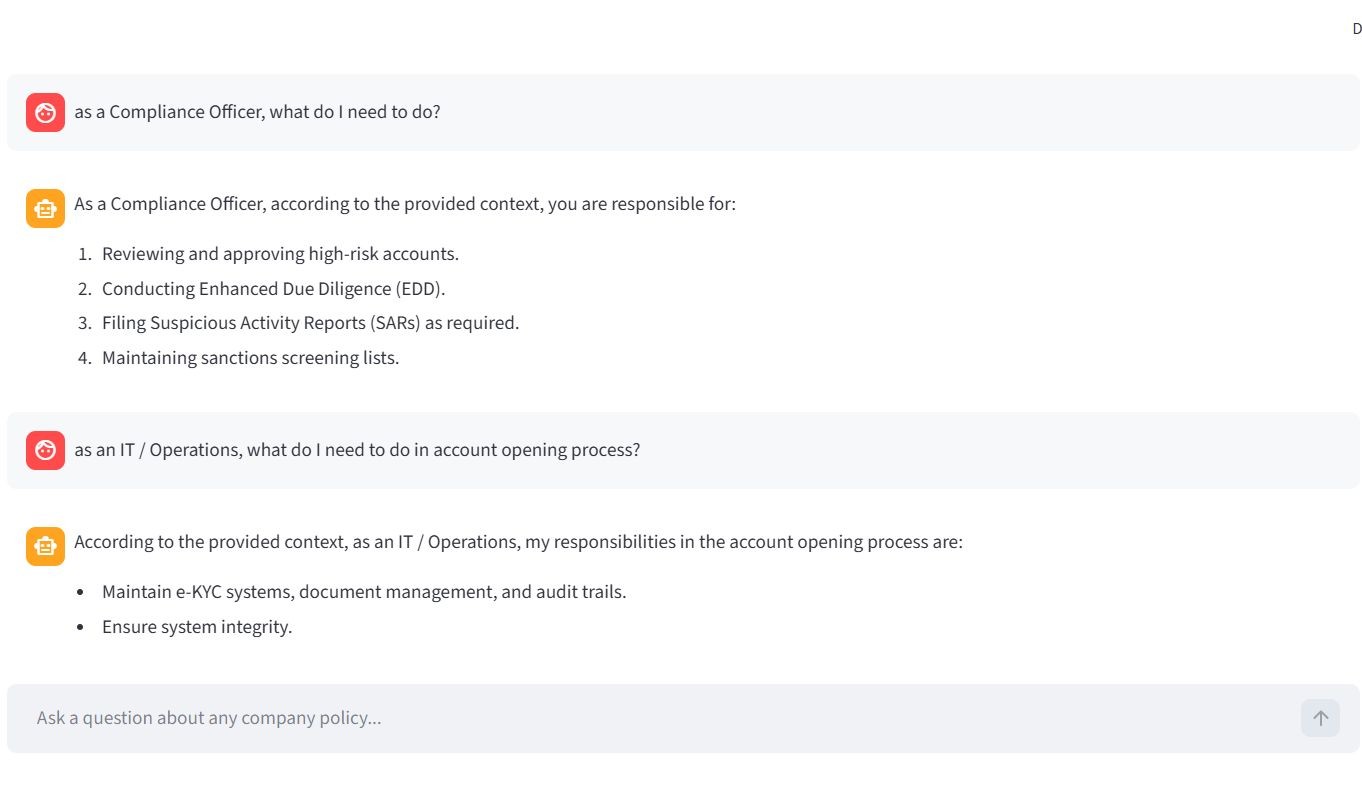
Out of the box, LLMs have no memory of a conversation. Even with RAG providing document context, the model struggles with follow-up questions due to the absence of prior interaction awareness. See the example below.
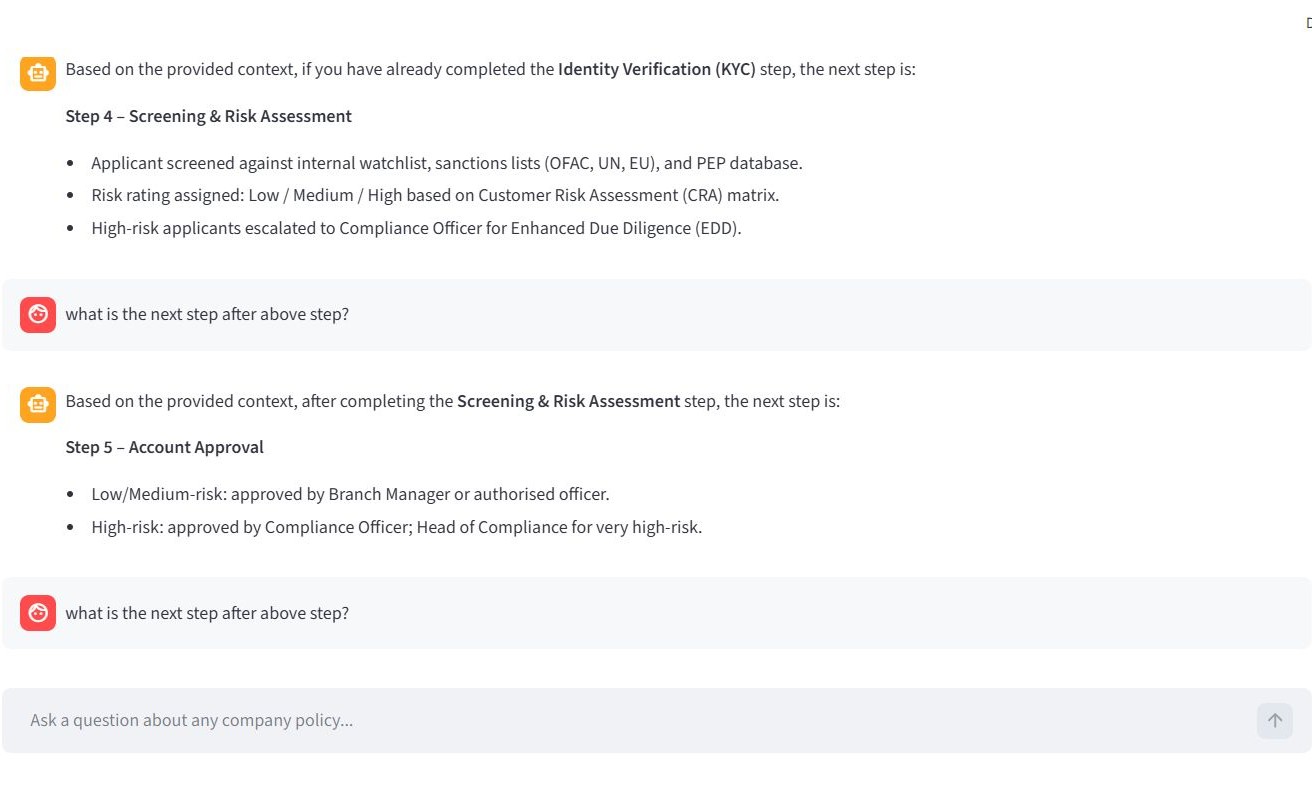
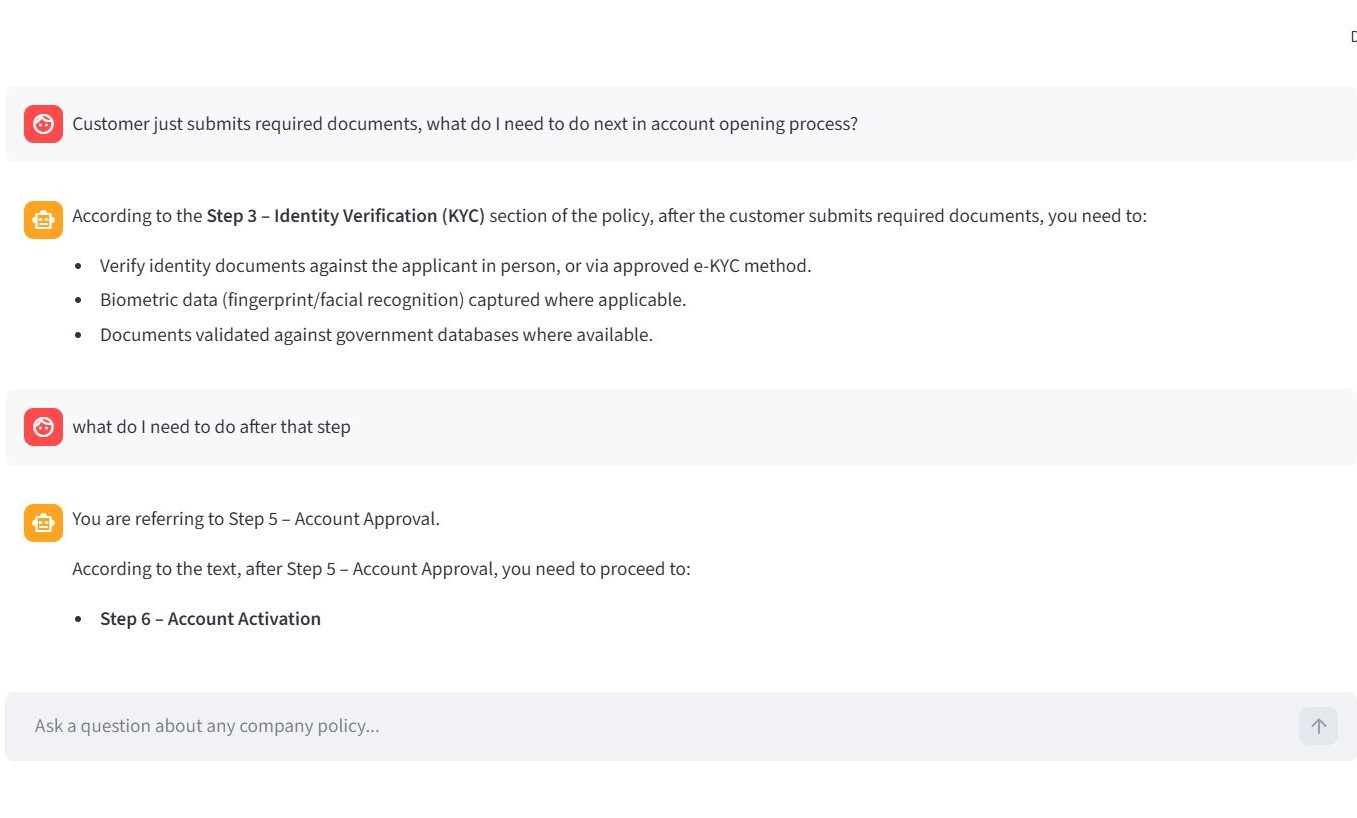 Solution: Using React state on the Next.js frontend, I cached the dialogue on the client side. Before sending each new prompt, the React application packages the entire conversation history and sends it via API to the Vercel Python backend, which reconstructs the LangChain
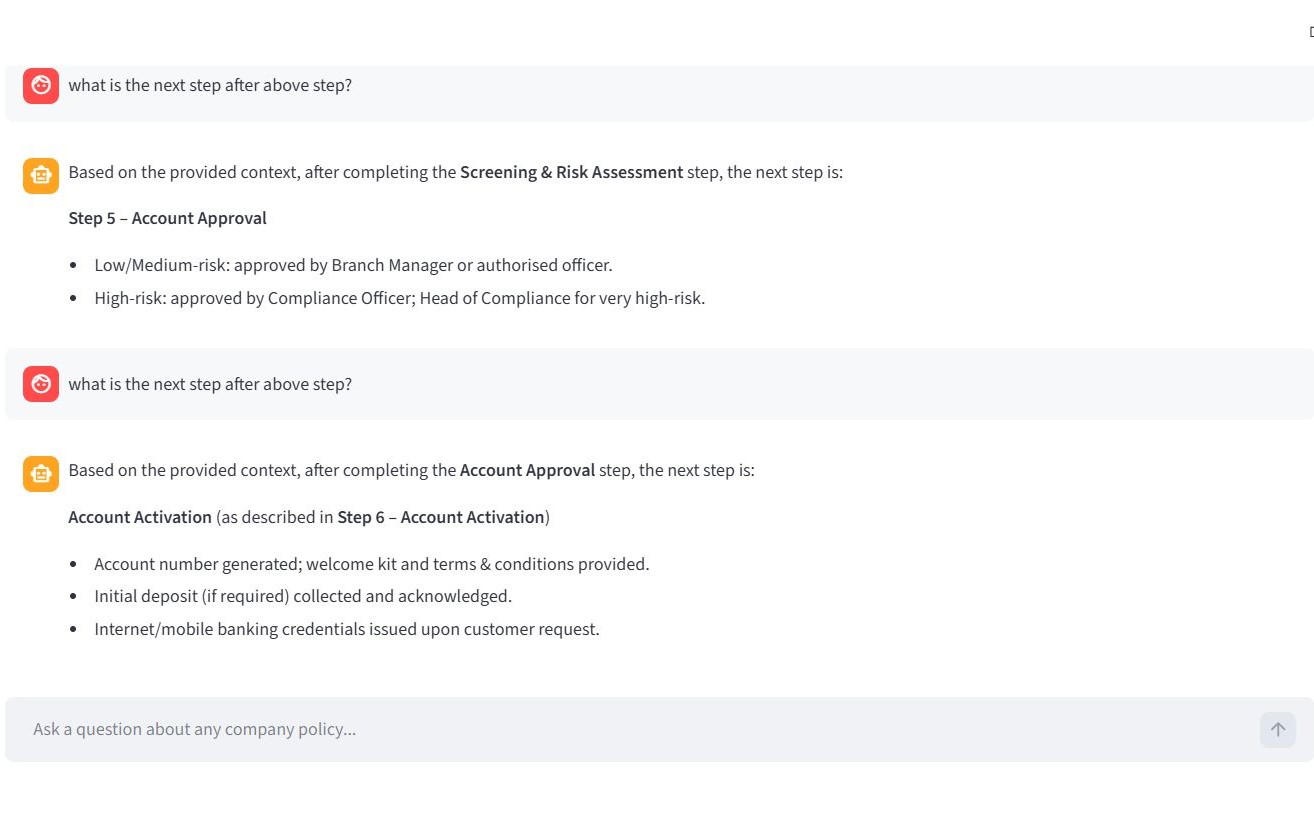
 HumanMessage and AIMessage history. This provides conversational memory without requiring a heavy backend database.
This enabled conversational continuity, as illustrated in the examples below.
Challenge 3 — Inference latency
During early development, I ran the entire pipeline, including the generation LLM, locally via Ollama. However, running a local LLM created slow response time (4 - 5 minutes to generate a response).
Solution: I used Google Gemini’s API for vectorization and the Groq API for text generation. Groq’s LPUs are engineered specifically for ultra-fast LLM inference, reducing response time from minutes to milliseconds.
5. Try it yourself
I invite you to test the application and evaluate the retrieval quality firsthand.
How to evaluate:
- Ask specific questions about account creation, required documentation, or compliance thresholds.
- Test the guardrails: Ask something unrelated to banking (e.g. “What is the capital of France?”) to see strict prompt engineering in action.
- Test the memory: Ask a follow-up question without repeating the subject (e.g. “Does that apply to corporate accounts too?”).
- Use the sidebar’s PDF viewer to cross-reference AI answers directly with the source document.
6. References
- Lewis, P., et al. (2020). Retrieval-Augmented Generation for Knowledge-Intensive NLP Tasks.
- OWASP Foundation (2025). OWASP Top 10 for Large Language Model Applications.
- Forbes Tech Council (2024). Transforming Businesses With LLMs: Risks And Use Cases.
- Gao, Y., et al. (2023). Retrieval-Augmented Generation for Large Language Models: A Survey.